SPECIFICATIONS
Brand Name: xintemei
Bulk Packaging: Yes
Cartridge Code: 45807105 45807106 45807107 45807120
Cartridge's Status: Full
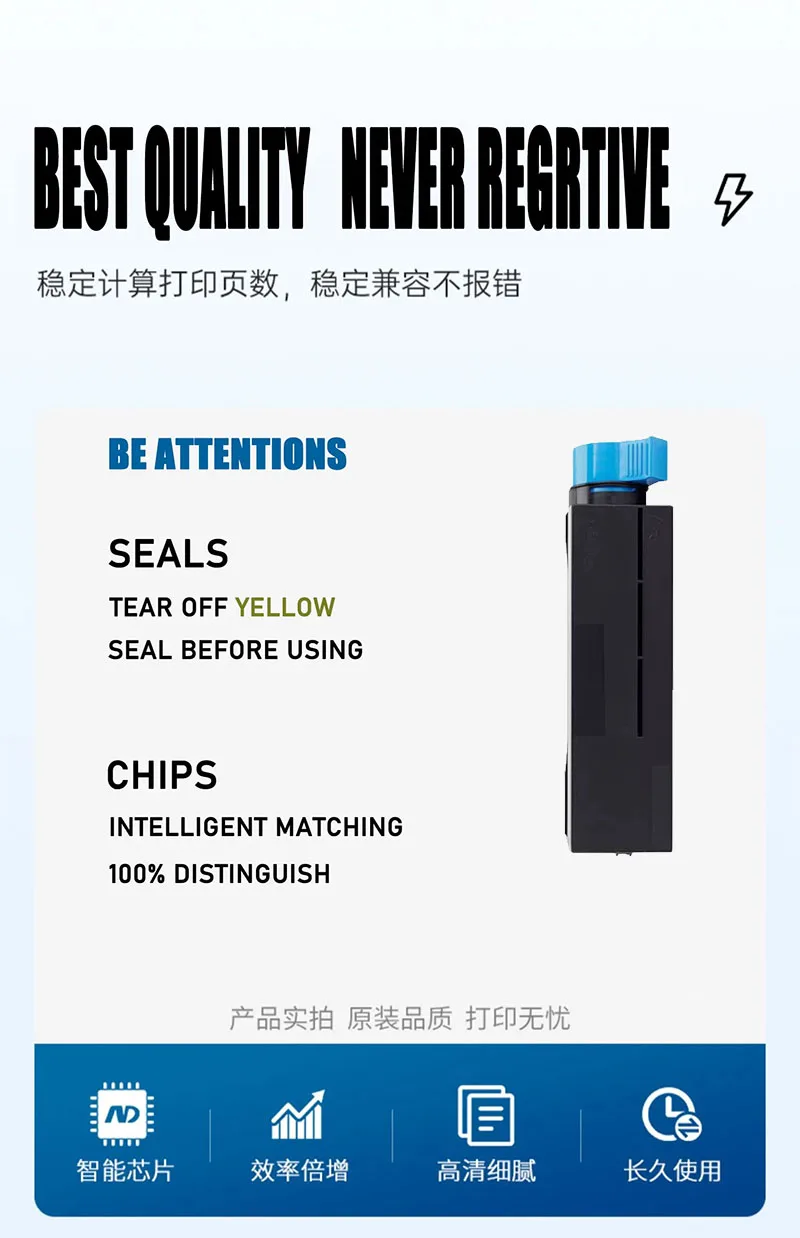
Feature: Compatible
Hign-concerned Chemical: None
Model Number: 412 432 472 492
Origin: Mainland China
Printer Model: Data B412dn B512dn B432dn MB472W MB492 MB562W
Type: Toner Cartridge
Version: EU MEA US AU
Yield of Page Count: 7K
*VERY VERYImportance Notice:*
1. Please TAKE NOTES that our "PHOTOs" in the link is just for your references. We will take responsibilities for the quality of our chips, but we can't guarantee you the chip photos. The chips you receive might be different from it~ If you have any requests about the chip appearances, please mark it down or contact with us before you placing orders. Or we will send the chips that work for your printer only!!!!
2. When you replace the toner chip, you need to refill toner powder too. Or it won’t work.
3. Make sure other parts are no problems. Some printers also have drum unit, developer, fuse and etc. If the printer doesn’t work, it might be other parts need to replace either!
Type:Toner Cartridge
Brand Name: Xintemei
Model Number: Data B412dn/B512dn/B432dn/MB472W/MB492 /MB562W
Cartridge Code: 45807105 45807106 45807107 45807120
Place of Origin: SZ, Guangdong, China, China (Mainland)
Drum Code:
TonerYield: 7000 Pages
Drum Yield:
Version: WW
State: New Toner Cartridge
Shipping: By SEA/DHL/Fedex/EMS
Compatible:100% Compatible
Guarantee:within 12 month
Packing:neutral or Brand pack or customized
Standard:SMTC&ISO9001
How to confirm your cartridge code? Here are some tips which might be helpful:
The toner cartridge code for a printer is usually marked directly on the cartridge, and this code is very important for purchasing the correct replacement. Here are the methods to identify the toner cartridge code:
1. Check the Cartridge Packaging: If you have the original packaging of the toner cartridge, the code is typically clearly printed on the box.
2. Inspect the Cartridge Itself: After removing the toner cartridge, you can usually find a label on the surface or side of the cartridge that includes information such as model number or part number, which is the code you need to look for.
3. Refer to the Printer Manual: In some cases, the user manual for your printer will also list compatible consumables, including specific models of the toner cartridge.
4. Visit the Official Website: You can visit the official website of the printer manufacturer, use the printer model to search for the corresponding consumable information, which includes the correct toner cartridge model.
5. Contact Customer Support: If the above methods do not provide accurate information, you can directly contact the official customer service, provide them with your printer model, and inquire about the suitable toner cartridge model.
It is crucial to use a toner cartridge that matches your printer, as an incompatible cartridge may lead to decreased print quality or even damage to the printer. When selecting, it's important to pay attention to ensuring quality and performance to avoid any adverse effects on the printer.
Region Verions:
DOM: Latin America, Korea
EUR: European countries
EXP: North America, Asia except China, Africa
MEA: Middle East countries
CHN: China
Related chips for Samsung:
D101 T117 D115 D111
D203 D204 2020 2022 2070 2160 2165 2168 2620 C2670 2820 2870 2200
D303 D358 360 362 363 364 365 367 368 3300 3302 3303 3304 3305 3307 3320 3325 3370 3375 3400 3402 3405 3820 3825 3870 3875
K405S 406 415 C423 470 475 4020 4025 4070 4075 4195 4220 4250 4300 4350 4370 4580 4650 4652 4655
504 K505 506 5370
605 606 607 610 K659S K660S 680 6200 6210 6240 6260 705 D707 708 R709
808 809S 8025 8030 8040 8123 8128 8640 8650 9021 9201 9251 9301
Related Chips for XEROX :
6000 6075 6080 6010 6100 6115 6120 6121 6125 6128 6180 6140 6250 6280 6300 6350 6360 6500 6505 C6550 6600 6605 C6680 6700
LB316 P350 M355 C3000 3010 3020 3025 3040 C3055 3060 3065 3070 3100 3119 3140 3150 3155 3160 3200 3220 3210 3250 3260 C3290 C3300 3315 3320 3325 C3350 C3360 3370 3371 3373 3375 3428 3435 3450 3500 3550 C3540 3600 3615 3635
440 405 P455 C4000 4050 4060 4070 4110 4112 4118 4127 4150 4250 4260 C4350 C4430 4470 4475 4500 4510 4590 4595 4600 4620 4622
505D C525 550 560 C5000 5060 5070 5016 5019 5020 5021 5065 5222 5225 5230 5250 5330 5325 5335 5340 5350 5400 5500 C5540 5550 C5570 C5575 C5580 5645 5665 5675 5687 5730 5735 5740 5745 5750 5765 5775 5790 5845 5855 5865 5875 5890
CP105 CP100 F110 PE120 D125 DC1080 C1110 C1190 CP200 CP205 PE220 225 240 242 250 252 260 DC2000 2056 2058 2060 2065 C2090 2100 2108 C2120 C2250 C2255 C2260 C2263 C2265 2270 2275 C2535
700 7000 7080 7100 7120 7125 7228 7232 7235 7242 7245 7328 7335 7345 7346 7400 7425 7428 7435 C7500 7525 7530 7535 7545 C7550 7556 C7600 7655 7675 7760 7765 7775 C7780 7800 8000 9260 9280 9281 9310 9311 9500
Chips for OKI : 110 130 160 6200 6300 6500 260 280 290 2032 2200 2232 2400 2500 2520 2540 2632 2636 301 310 312 321 330 361 3300 3400 3450 3451 3520 3600 B410 411 B420 B430 431 4140 B440 460 461 470 471 491 480 4400 4600 510 511 530 531 560 561 562 5430 5431 5460 5461 5462 5500 5550 5600 5650 5700 5750 5800 5850 5900 5950 610 6000 6050 C6100 6150 710 711 720 730 760 770 780 7411 801 810 811 820 821 822 830 831 840 841 860 861 8430 8460 8600 8800 910 930 9600 9650 9655 9800 9850
Chips for Kyocera: 180 181 1020 1024 1025 1028 1030 1035 1040 1060 1100 1120 1124 1125 1128 1130 1135 1300 1320 1350 1800 1801 220 250 2000 2020 2026 2100 2126 2050 C2520 C2525 2526 2540 2550 2560 2626 2810 2820 300 3050 3060 3040 3050 C3225 C3232 3500 3550 3900 3920 400 420 458 4000 4020 C4035 4050 4100 4200 4300 4500 4550 500 520 5015 5016 5020 5030 5050 5100 5150 5200 5250 C5300DN C5350DN 5400 5500 5550 6025 6950 6970 868 8020 8025 8500 8600 9130 9530
Chips for Dell :1130 1133 1135 1160 1230 1235 1250 1260 1265 1320 1350 1355 1500 1600 1660 1700 1710 1720 1760 1765 1815 2130 2135 2145 2150 2155 2330 2335 2350 2355 2500 3000 3100 3010 3110 3115 3130 3760 3765 5100 5110 5130 5200 5210 5310 5300 5330 7130 7330
Chips for Ricoh :
100 111 150 1000 1100 1140 1180 1800 1900 1910 20 200 201 202 203 204 220 222 231 232 2030 2050 2051 2100 2551 2350 2200 2500 2550 2800 300 305 310 311 3000 3002 3003 3200 3224 3228 3232 3235 3245 3300 3400 3410 3500 3501 3502 3503 3510 3800 400 410 411 430 431 4000 4005 4500 4502 4503 5000 5502 5503 5100 5200 5210 5501 5502 600 6003 7000 810 811 820 821 830 8000
Notes for Replacing:(For Chips)
1) Please make sure you have ability to change
2) Find the correct toner cartridge, take off the old one
3) Close printer cover (Do not close power), wait printer display “No drum or toner”
4) Then put new toner cartridge or old toner cartridge which full-filled with powder and chips
5) When machine working, Do not close or open machine, or chips data will be destroyed
If you need more info, please feel free to contact us for help.
Notes for Replacing:(For Cartridges&Drum Units)
1) Please make sure you have ability to change
2) Find the correct toner cartridge, take out the old one
3) Close printer cover (Do not close power), wait printer display “No drum or toner”
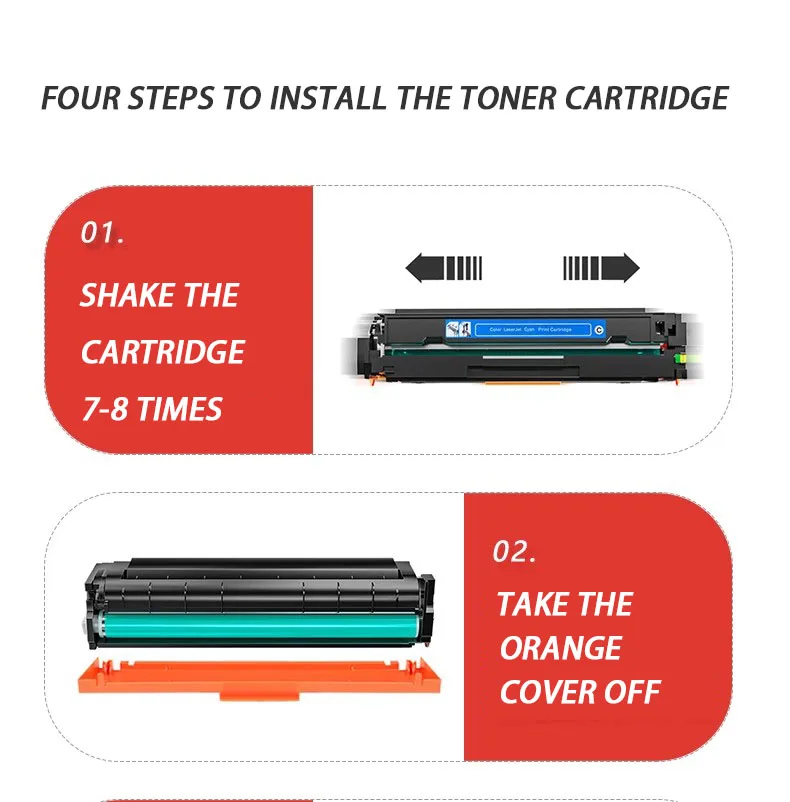
4) Take the new cartridge and shake 7~8 times to release the powder.
5) Take off the protection cover from the toner cartridge or drum unit.
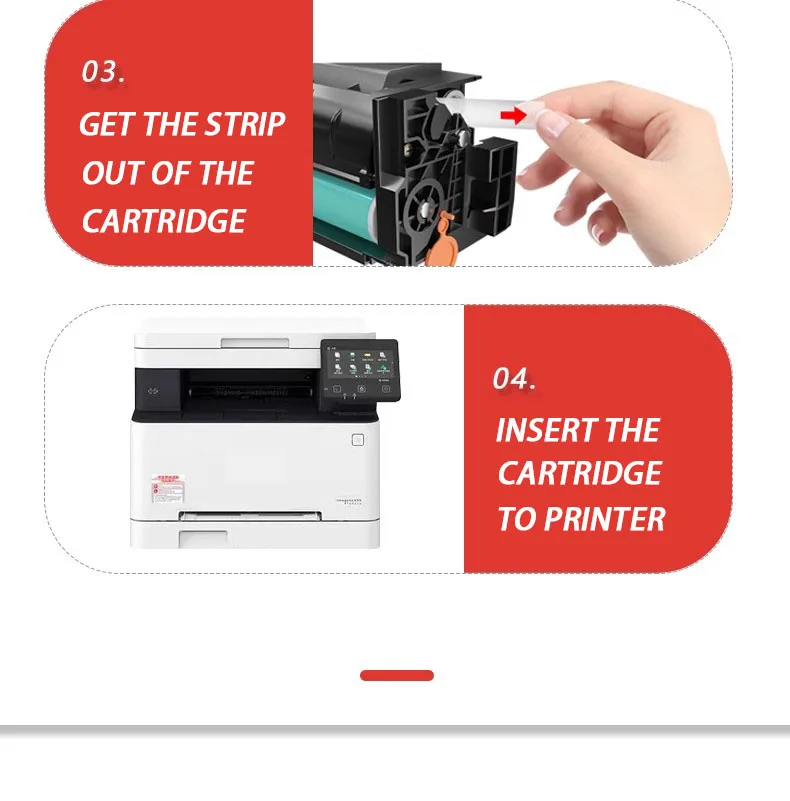
6) Take off the isolated fasten (some has some not) and Pull out the strip seal.
7) Put the cartridge or drum unit inserting to the printer
8) When machine working, Do not close or open machine, or chips data will be destroyed
If you need more info, please feel free to contact us for help.
Notes for Replacing:(For Toner Refill)
1) Please make sure you have ability to change
2) Find the correct toner cartridge, take out the old one
3) Clean the reset toner which inside the cartridge
4) Check out the waste toner and pour them out.
5) Cover the wast toner port of the toner cartridge with a round cover.
6) Open the toner cartridge which the hole to refill the powder
7) Put up the toner cartridge and insert the funnel mouth into the powder port to add powder.
8) Close the powder refill hole.
If you need more info, please feel free to contact us for help.
Attentions about Chips Installation
Without or just a few powder will burn out chips. Old cartridge please fills powder before change chips:
1. Take out drum or toner cartridge from printer
2. Close printer cover (Do not close power), wait printer display “No drum or toner”
3. Then put new toner cartridge or old toner cartridge which full-filled with powder and chips
4. When machine working, Do not close or open machine, or chips data will be destroyed
5. The chips are for counting pages only. If the chips recognized by the machine, we won't take responsibilities for other problems.
When you replace new toner chip, you need to refill toner too. Please refer to tips as following:
These tips are very important, and for users of bulk toner, following these suggestions can help ensure print quality and the proper functioning of the printer. Here is a further explanation of these tips:
1. Clear the Waste Toner Container: Before adding new toner, you should first empty the waste toner container in the printer. This is because residual waste toner can mix with the new toner, affecting the print quality. Regularly cleaning out the waste toner is also part of maintaining the cleanliness inside the printer, which helps to extend the machine's lifespan.
2. Identify the Source of Problems: If there are regular black spots, black lines, or background gray appearing during copying, this may indicate other issues with the printer (such as a damaged photoreceptor drum, fixing unit malfunction, etc.), rather than just low toner. At this point, directly adding more toner will not solve the problem and may lead to further waste. The correct approach is to diagnose and fix these issues before considering whether additional toner is needed.
3. Protect the Photoreceptor Drum: The photoreceptor drum is a highly sensitive component that is easily affected by light, especially strong light. Exposure to direct sunlight can cause changes to its surface properties, leading to decreased print quality or even complete failure. Therefore, it's essential to block off light sources during operations and complete the relevant tasks quickly to minimize exposure time.
4. Proper Storage of Unused Toner: Once the package is opened but not all the toner is used immediately, the opening must be sealed properly to prevent moisture from entering and causing the toner to clump. Dampened toner not only affects print quality but can also clog internal printer passages, causing more serious damage.
In summary, correctly handling and using bulk toner is crucial for ensuring good print quality and extending the life of the equipment. If you are not particularly familiar with this process, it is recommended to seek the assistance of a professional for maintenance and care.
About Replace a new toner cartridge:
The specific steps for installing a printer toner cartridge (also known as a toner cartridge or powder cartridge) may vary depending on the brand and model of the printer. However, the installation process for most laser printers is quite similar. Below are general steps to guide you through replacing the toner cartridge in your printer:
1. Preparation:
- Ensure that you have purchased a toner cartridge that is compatible with your printer.
- Before starting, turn off the power to the printer and make sure it has completely cooled down.
- Prepare a clean cloth or paper towel to prevent getting your hands or desk dirty during the replacement.
2. Open the Printer Cover:
- Depending on your printer model, find and open the top or front cover of the printer. Some printers may require you to remove other parts first, such as the paper tray.
3. Remove the Old Toner Cartridge:
- Locate the currently used toner cartridge. In most cases, you can pull out the old cartridge by hand. If it cannot be pulled out directly, refer to the printer's user manual for the specific release mechanism.
- Be careful when pulling it out to avoid spilling any remaining toner. Place the old cartridge aside, making sure it does not come into contact with any objects to avoid contamination.
4. Prepare the New Toner Cartridge:
- Remove the new toner cartridge from its packaging. Check if there are any protective seals or parts that need to be removed.
- If present, gently peel these off according to the instructions. However, note that in some cases, all seals should only be removed in the final step to prevent accidental leaks.
- Gently shake the new cartridge a few times to distribute the powder evenly inside.
5. Install the New Toner Cartridge:
- Align the new toner cartridge and insert it into the printer. This usually involves sliding the cartridge into a specific track or pressing it until you hear a click indicating it is locked in place.
- Refer to the marks or arrows on the printer for the correct orientation.
6. Complete Setup:
- Close the printer cover.
- Turn on the printer power and follow any on-screen prompts for necessary initialization or calibration procedures. Some printers may automatically recognize the newly installed cartridge and perform a cleaning cycle.
- Perform a test print to confirm that everything is working correctly.
7. Dispose of Waste:
- Properly dispose of the old toner cartridge. Many areas offer recycling services, encouraging users to recycle used consumables through designated channels to reduce environmental pollution.
If you encounter difficulties or uncertainties, please consult the manual that came with your printer or visit the manufacturer's website for more detailed instructions. For operation guides specific to your model, you can also contact customer service for assistance.
Payment terms
1. Payment method: Credit Card, MoneyBooker, Bank Transfer, Escrow
2. Please make the full payment within 5 days of placing your order.
3. Please make sure you read the entire specification and agree to transaction terms before
buying.
Shipping terms :
1. Ship Via: EMS, DHL, UPS, TNT, FEDEX,
2. Ship out: 3-5 days upon received your payment.
3. Transit Time:
EMS:approx 5-15 working days.
DHL, UPS, TNT,FEDEX: approx 3-8 working days.
4. We will provide the tracking number as soon as ship out.
5. The buyer is responsible for any taxes or customs duty by import countries, the seller is responsible for any taxes charged by export countries.
Return Policy:
If the buyer find it's materially different from the description when the items arrived, we will accept refund or replacement of the item. The buyer should notify us within 3 days of receipt to gain the Return or Replacement Authorization. The goods must be returned as good condition as original. Once we receive the returns, we will replace it for another one or give you REFUND MINUS THE SHIPPING COST!
You must contact with us before return the item back, and we won’t refund the shipping charges and won't pay for the shipping cost back to us unless the problems is caused by our store!
Shipping charges are nonrefundable. The following guideline applied to orders where customers
received free shipping: Customers receiving free shipping will be credited the
full purchase price of all products returned shipping if their entire order is
returned for a refund.
Refunds:
Customers returning items can expect to be refunded in the method in which they paid within 7-15 business days of our receipt of their return.
Feedback:
We rely on our Aliexpress reputation and customer satisfaction to succeed, get satisfied with our goods and service. So your feedback is extremely important to us. Please leave good feedback, thanks.